
BACnet and Modbus: How FlareSens EDGE Talks to Every Fire Panel
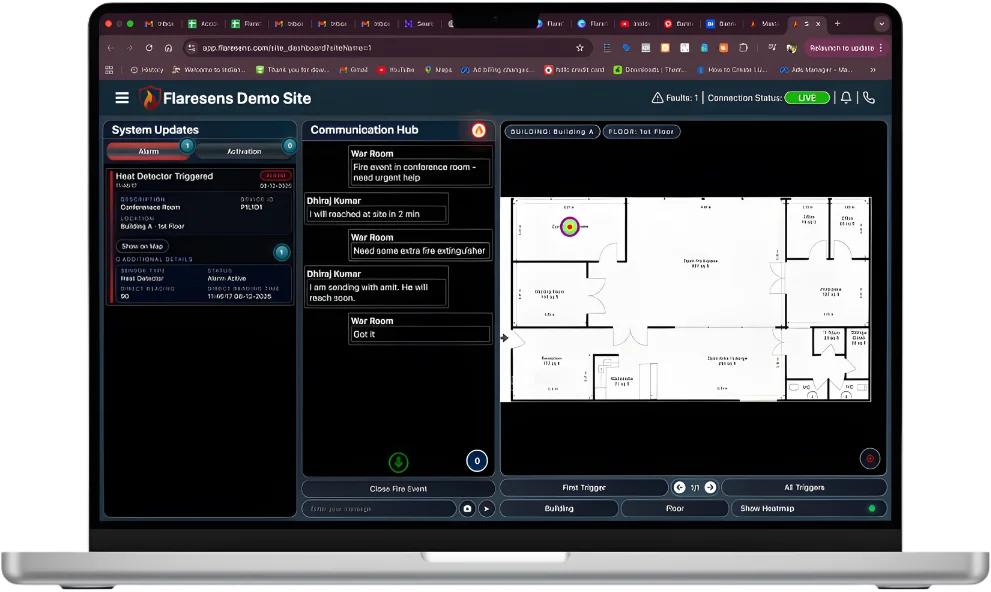
Most fire panels already speak a standard protocol. BACnet and Modbus are how a multi-vendor building gets onto one screen without replacing panels. The question is not whether your panel can be read, but at what level of detail.
Walk into any large commercial building in India — a corporate park in Bengaluru, a hospital in Delhi, a shopping mall in Mumbai — and you will find fire alarm panels from at least two or three different manufacturers. Honeywell in one wing, Siemens in another, Ravel in the basement. This is not poor planning; it is the natural outcome of a building that was constructed in phases, managed by different contractors, or expanded over a decade.
The problem is that these panels do not talk to each other. Each one monitors its own zones, displays its own faults, and sounds its own alarms. There is no single view of the building's fire safety status. When a facility manager wants to know "are all my fire systems healthy right now?", the answer requires physically visiting every panel location — or trusting the AMC vendor's quarterly report, which is often weeks out of date.
This is the problem that communication protocols like BACnet and Modbus solve. And this is how FlareSens EDGE uses these protocols to connect to virtually any fire panel in India and deliver real-time, device-level monitoring to a single cloud dashboard.
What Are BACnet and Modbus?
Before diving into fire panel integration, it helps to understand what these protocols actually are and why they exist.
BACnet (Building Automation and Control Networks)
BACnet is a communication protocol developed by ASHRAE (American Society of Heating, Refrigerating, and Air-Conditioning Engineers) and adopted as an international standard (ISO 16484-5). It was designed specifically for building automation systems — HVAC controls, lighting, access control, and fire safety.
BACnet uses an object-oriented data model. Every device in a BACnet network is represented as a collection of "objects" — an Analog Input object for a temperature sensor, a Binary Input object for a smoke detector, a Notification Class object for alarm routing. Each object has "properties" that describe its current state, limits, and configuration.
For fire panels, this means BACnet can expose rich, granular data: not just "Zone 5 is in alarm" but "Smoke detector at BACnet address 14, object AI:3, current analog value 2.8 (above alarm threshold of 2.5), in alarm state since 14:32:07."
BACnet supports multiple transport layers relevant to fire panel installations:
- BACnet IP — runs over standard Ethernet/IP networks. Most modern fire panels from Honeywell, Siemens, and Bosch support BACnet IP.
- BACnet MS/TP — runs over RS-485 serial wiring. Common in older installations and smaller panels. EDGE supports both.
Modbus
Modbus is a serial communication protocol originally published by Modicon (now Schneider Electric) in 1979 for use with programmable logic controllers. It is simpler and older than BACnet, but extraordinarily widespread — especially in Indian fire safety installations, where many domestic manufacturers like Ravel, Agni, and C-TEC use Modbus as their primary integration protocol.
Modbus works on a master-slave architecture. The "master" (in our case, FlareSens EDGE) sends read requests to the "slave" (the fire panel), asking for the values stored in specific registers. Each register holds a piece of data — detector status, zone alarm state, panel fault condition, battery voltage, and so on.
The challenge with Modbus is that register maps are manufacturer-specific. Register 40001 on a Ravel panel means something completely different from Register 40001 on an Agni panel. There is no standard object model like BACnet provides. This means any Modbus integration requires a per-manufacturer (and often per-model) register mapping exercise.
Modbus also comes in multiple variants:
- Modbus RTU — serial communication over RS-485. The most common variant in Indian fire panels.
- Modbus TCP — runs over Ethernet. Found in newer panels and gateways.
Why Fire Panels Use These Protocols
Fire alarm panels are not standalone devices. In a well-designed building, the fire panel needs to communicate with several other systems:
- Building Management Systems (BMS) — to trigger HVAC shutdown, pressurize stairwells, and release magnetic door holders during a fire alarm
- Public Address (PA) systems — to broadcast evacuation messages in the affected zones
- Access control systems — to unlock emergency exits and release turnstiles
- Lift controllers — to recall lifts to the ground floor and take them out of service
- Monitoring platforms — to provide remote visibility into panel health and alarm status
BACnet and Modbus are the lingua franca that make these integrations possible without requiring every system to be from the same manufacturer. A Honeywell fire panel can communicate with a Siemens BMS via BACnet. A Ravel fire panel can send data to a monitoring gateway via Modbus RTU.
Without these protocols, the only alternative is relay-based integration — physical voltage contacts that signal binary states (alarm/normal, fault/healthy). Relays work, but they carry almost no information. FlareSens CORE uses relay-based monitoring as a universal fallback, but the data is limited to zone-level alarm, fault, and supervisory states. Protocols like BACnet and Modbus unlock an entirely different depth of data.
The Multi-Vendor Challenge in Indian Buildings
India's commercial building stock presents a protocol integration challenge that is more acute than in most other markets. Here is why:
- Phased construction — Large campuses (IT parks, hospital complexes, university buildings) are built over 5-15 years. Each phase may use a different fire safety contractor and a different panel brand.
- Renovation and tenant fit-outs — In commercial office buildings, tenants often install their own supplementary fire detection within their leased floor plates, frequently using panels different from the building's base system.
- AMC vendor changes — When a building switches annual maintenance contract (AMC) vendors, the new vendor may recommend or install equipment from manufacturers they represent, adding yet another brand to the mix.
- Domestic and international mix — Indian buildings commonly have a combination of international panels (Honeywell, Siemens, Notifier) in premium areas and domestic panels (Ravel, Agni) in service areas, each with different protocol capabilities.
The result is that a single building or campus may have three, four, or even five different fire panel brands, each with its own protocol dialect, its own configuration software, and its own data format. Getting a unified view of fire safety across such a building is the core challenge that FlareSens EDGE was designed to solve.
How FlareSens EDGE Connects to Any Panel
EDGE is a hardware gateway that sits alongside the fire alarm panel and communicates with it using the panel's native protocol. Here is how the integration works at a technical level:
Step 1: Physical Connection
EDGE connects to the fire panel's communication port — an RS-485 terminal for Modbus RTU or BACnet MS/TP, or an Ethernet port for Modbus TCP or BACnet IP. No changes are made to the panel's internal wiring, loop configuration, or programming. The fire panel continues to operate exactly as before.
Step 2: Protocol Negotiation
EDGE identifies the panel's protocol and initiates communication. For BACnet panels, EDGE uses the "Who-Is / I-Am" discovery mechanism to enumerate all objects on the panel — every detector, module, zone, and system status point. For Modbus panels, EDGE loads the manufacturer-specific register map from its configuration library and begins polling the relevant registers at a defined interval (typically every 2-5 seconds).
Step 3: Device Mapping
This is the step that transforms raw protocol data into actionable information. EDGE maps each protocol address to a human-readable device identity. Instead of "BACnet object BI:47 is in alarm," the system shows "Smoke detector SD-3F-012, Third Floor Conference Room 3B, is in alarm." This mapping is configured during installation using floor plans and device schedules provided by the facility team.
Step 4: Cloud Streaming
Once connected and mapped, EDGE streams all panel events to the FlareSens Live Monitoring Station via a secure, encrypted connection. Every alarm, fault, disablement, restoration, and supervisory event is timestamped and logged. The cloud platform aggregates data from all EDGE gateways across the building (or across multiple buildings) into a single dashboard.
Device-Level vs Zone-Level: Why the Difference Matters
Many building monitoring approaches stop at zone-level data — "Zone 7 is in alarm," "Zone 12 has a fault." This is what relay-based monitoring provides (as in FlareSens CORE), and for many sites it is a significant improvement over no monitoring at all.
But zone-level data has real limitations when managing fire safety operationally:
| Scenario | Zone-Level Data | Device-Level Data |
|---|---|---|
| Alarm response | "Zone 7 alarm" — responder must search the entire zone | "Detector SD-2F-017, Room 214" — responder goes directly to the room |
| Fault diagnosis | "Zone 12 fault" — AMC vendor checks all devices in the zone | "Heat detector HD-B1-003, Basement Store Room 2, communication loss" |
| Maintenance planning | No visibility into which devices need attention | Dashboard shows 12 detectors with sensitivity drift, scheduled for cleaning |
| Compliance reporting | Can only report zone-level uptime | Can report per-device health, test history, and fault resolution time |
Device-level monitoring is only possible through protocol-based integration (BACnet or Modbus), which is why EDGE exists as a distinct product from CORE. For sites that want the deepest possible visibility, EDGE delivers data at the resolution of individual detectors and modules — typically hundreds or thousands of data points per building.
What a Real Deployment Looks Like
To make this concrete, here is a simplified example of how EDGE was deployed at a multi-building corporate campus in Gurugram:
- Site profile: 4 buildings, 3 basements, approximately 1,200 fire detectors and 80 MCPs across all buildings
- Panel mix: Honeywell Morley-IAS (Buildings A and B, BACnet IP), Ravel (Building C, Modbus RTU), Siemens Cerberus (Building D, BACnet MS/TP)
- EDGE units deployed: 6 (one per panel network segment)
- Installation time: 3 days, including device mapping for all 1,280+ addressable points
- Result: Single dashboard showing real-time status of every detector across all four buildings, with mobile alerts routed to building-level facility managers and a central Live Monitoring Station team
Within the first month, the system identified 47 detectors in fault across the four buildings — 31 of which had been in fault for over 90 days without being addressed by the AMC vendor. Twelve of those faulted detectors were in basement zones. Without device-level protocol integration, these faults were invisible to the facility team.
Choosing Between CORE and EDGE
Not every site needs protocol-level integration. Here is a practical decision framework:
- Choose CORE if your panels are older, non-addressable (conventional) systems, or if your primary need is basic alarm/fault/supervisory visibility across sites. CORE uses relay contacts and works with literally any panel, regardless of brand, age, or protocol capability.
- Choose EDGE if your panels are addressable and support BACnet or Modbus, and you need device-level visibility — individual detector health, per-device fault tracking, analog value monitoring, and granular compliance reporting.
- Combine both in campus environments where some buildings have modern addressable panels (use EDGE) and others have older conventional systems (use CORE). The Live Monitoring Station unifies data from both.
The Standard Fire Panels Already Speak — You Just Need to Listen
The fire panels in your building already generate a wealth of data. Every detector continuously reports its status. Every fault is logged. Every alarm is timestamped. The information is there, stored in BACnet objects and Modbus registers, waiting to be read.
The missing link in most Indian buildings is not the fire panel hardware — it is the integration layer that reads this data, translates it into actionable information, and delivers it to the people who need it. FlareSens EDGE is that integration layer: a protocol-agnostic gateway that speaks BACnet and Modbus fluently, connects to any panel brand, and streams device-level data to a cloud platform that makes fire safety manageable, measurable, and proactive.
If you manage a building with multiple fire panels and want to see what unified, device-level monitoring looks like in practice, book a 20-minute demo — we will show you real data from a live site.
Frequently Asked Questions
What is the difference between BACnet and Modbus for fire panels?
BACnet (Building Automation and Control Networks) is an ASHRAE/ISO standard designed specifically for building systems, offering rich object-oriented data and built-in discovery. Modbus is an older, simpler serial protocol widely used in industrial and fire safety equipment in India. BACnet provides more granular data natively, while Modbus requires register maps specific to each manufacturer. Both can deliver device-level fire panel data when properly integrated.
Can FlareSens EDGE connect to any fire panel brand?
Yes. FlareSens EDGE is OEM-independent and supports BACnet IP, BACnet MS/TP, Modbus TCP, and Modbus RTU protocols. It has been tested with panels from Honeywell, Siemens, Morley, Ravel, Agni, Gent, Notifier, and several other manufacturers common in Indian installations. For panels that use proprietary protocols, EDGE can connect via relay-based contact monitoring as a fallback.
What is the difference between device-level and zone-level fire monitoring?
Zone-level monitoring tells you that a general area (e.g., "Zone 7 — Second Floor East Wing") has an alarm or fault, but not which specific detector triggered it. Device-level monitoring identifies the exact device — for example, "Smoke detector SD-2F-017 in Room 214, Second Floor East Wing." Device-level data reduces investigation time from minutes to seconds and enables precise maintenance tracking.
How long does it take to install FlareSens EDGE on an existing fire panel?
A typical single-panel EDGE installation takes 2-4 hours, including physical connection, protocol configuration, device mapping, and cloud connectivity verification. No changes are made to the fire panel programming or wiring. For multi-panel sites, a full deployment is usually completed within 1-2 working days. The fire alarm system remains fully operational throughout installation.