
What Is a Fire Alarm Graphic System? An OEM-Independent Guide
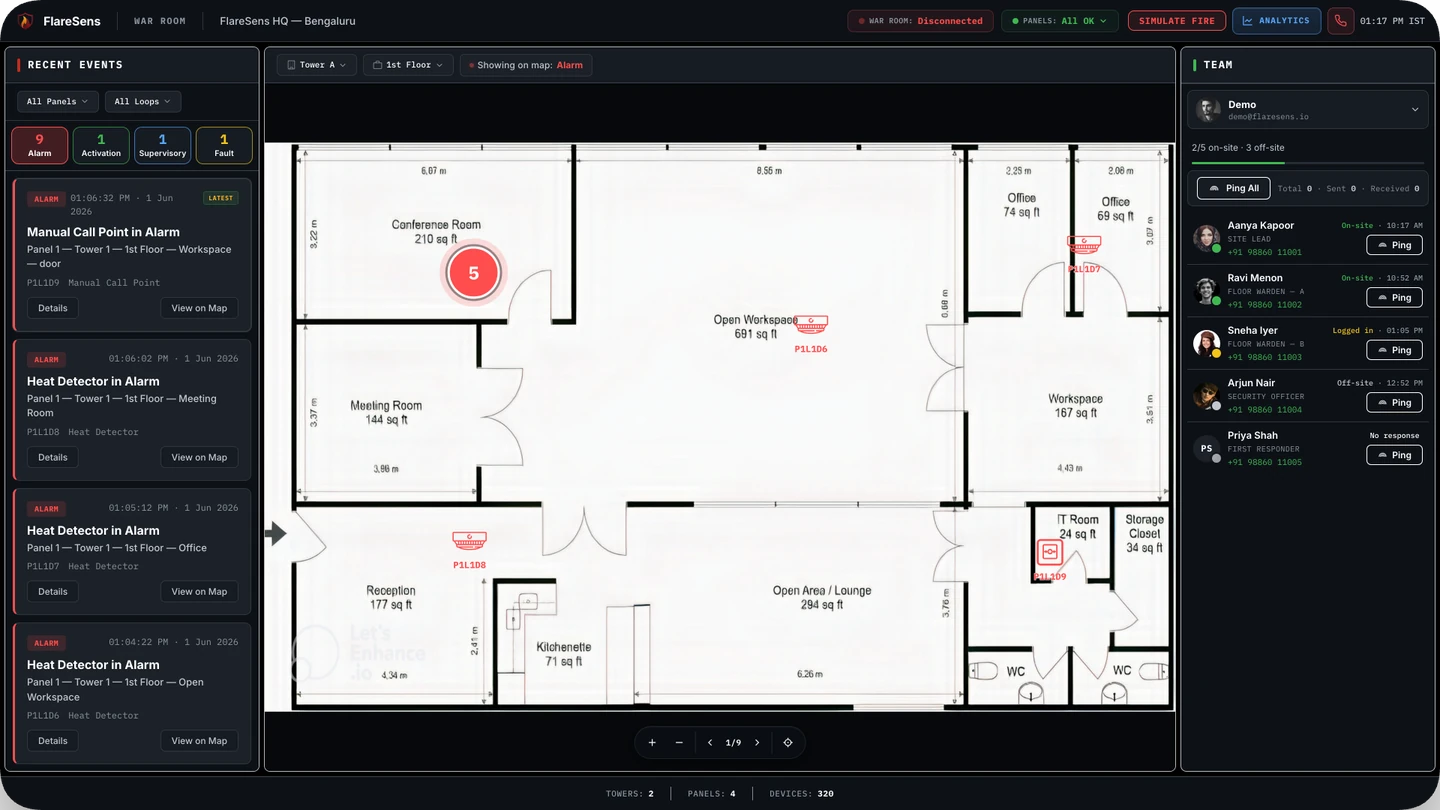
A fire alarm graphic system shows your fire panel on a live floor plan, so an alarm becomes a place rather than a zone number. Most are locked to a single panel brand. OEM-independent means one screen across every panel you already own.
Walk up to a fire alarm panel during an event and you will see a line of text: a zone number, a device address, a fault code. To anyone but a trained technician, it means nothing — and even to a technician, it does not say where in the building the event actually is. A fire alarm graphic system solves exactly that problem. It takes what the panel is reporting and shows it on a live map of your building, so the answer to "what is happening and where" is obvious at a glance.
This guide explains what a fire alarm graphic system is, how it works, why most of them are locked to a single panel brand, and what "OEM-independent" means — the single most important thing to understand if your building runs equipment from more than one manufacturer.
What Is a Fire Alarm Graphic System?
A fire alarm graphic system is software that displays the real-time status of one or more fire alarm panels on a graphical floor plan of the building. Rather than reading a coded event on the panel's small display, an operator sees the event appear at its exact location on the map — colour-coded by type: alarm, fault, supervisory, or activation.
In practice, it turns a fire alarm system from something only the panel understands into something a security guard, a facility manager, or a building owner can read instantly. The panel says "Zone 14, Device 007, Alarm." The graphic system shows a red dot pulsing on the third-floor east corridor. That difference — a code versus a place — is the entire point.
What a Fire Alarm Graphic System Actually Does
A capable graphic system does four things:
- Shows live events — every alarm, fault, supervisory signal and activation, the moment the panel reports it, in a running feed
- Places each event on a floor plan — so the operator sees the exact location, not just a zone or address
- Shows device health — which detectors and modules are healthy, and which have dropped out or gone into fault
- Supports a response — filtering by loop or panel, acknowledging events, and connecting the operator to the people who need to act
How a Fire Alarm Graphic System Works
Every fire alarm graphic system has to do two things: read the panel and draw the building.
1. Reading the panel
The graphic system connects to the fire alarm control panel and interprets the events it reports. Panels expose this data in different ways — a serial or RS-485 output, a relay contact per zone, an IP interface, or an open building protocol such as BACnet or Modbus. The graphic system reads that stream and translates each event into a structured record: what happened, on which device, at what time.
2. Drawing the building
The building's floor plans are loaded into the system, and each detector, call point and module is placed at its physical position on the map. When the panel reports an event for a given device, the system lights up that device's position. On an addressable system this can be precise to the individual detector; on a conventional system it is precise to the zone.
Zone-level vs device-level graphics
The resolution of a graphic system depends on the panel behind it. A conventional (non-addressable) panel groups many detectors into a zone, so the graphic can only show "somewhere in this zone." An addressable panel identifies each device individually, so the graphic can show the exact detector that tripped. A good graphic system supports both, and makes the most of whatever the panel can tell it.
The Problem: Most Graphic Systems Are Locked to One Brand
Here is the catch that most building owners discover too late. Traditionally, a fire alarm graphic system is sold by the panel manufacturer, and it only works with that manufacturer's panels. The graphic software for Brand A will not read a Brand B panel, and vice versa.
That is fine for a single building with a single panel from a single vendor. But real portfolios are never that tidy. A campus, a hospital, a hotel group, or a company managing many sites almost always ends up with a mix of panels — installed by different contractors, in different years, from different manufacturers. With brand-locked graphic systems, that means:
- A separate graphic system for each panel brand
- Separate screens, separate logins, and separate training for each
- No single view of the whole building or the whole portfolio
- A rip-and-replace bill if you want everything on one system — because the only way to unify is to standardise on one manufacturer's panels
In other words, the graphic system that is supposed to give you clarity ends up fragmenting it.
What "OEM-Independent" Means
An OEM-independent fire alarm graphic system is not tied to any single panel manufacturer. It is built to connect to panels from any brand and bring them all onto one screen. OEM stands for Original Equipment Manufacturer — the company that made your fire panel — and "OEM-independent" simply means the graphic system does not care who that was.
The practical effect is significant:
- One screen for every panel — Brand A, Brand B and Brand C all land in the same live view
- No rip-and-replace — you keep the panels you already own; the graphic system adapts to them, not the other way round
- One system to learn — operators train once, not once per brand
- A true portfolio view — every building, every manufacturer, on one dashboard
For any building or portfolio with more than one panel brand — which is most of them — OEM-independence is the difference between a graphic system that unifies and one that divides.
On-Premise vs Cloud Graphic Systems
Older graphic systems run on a dedicated PC wired to the panel, sitting in a control room. That works, but it means the view exists only in that room, on that machine. If nobody is at the desk, nobody sees the event.
A cloud fire alarm graphic system streams events to a secure cloud platform, so the same live view is available in any browser, on any device, from anywhere — and can push alerts to phones when no one is at the screen. Crucially, the cloud model is what makes multi-site monitoring possible: every panel across every building reports into one dashboard, instead of one PC per control room.
| On-premise | Cloud | |
|---|---|---|
| Where the view lives | One dedicated PC, wired to the panel | Any browser, any device, anywhere |
| If nobody is at the desk | Nobody sees the event | Alerts push to phones |
| Multiple sites | One PC per control room | Every panel, every building, one dashboard |
What to Look for in a Fire Alarm Graphic System (India)
If you are evaluating a graphic system for a building or portfolio in India, these are the criteria that matter most:
- OEM-independence — can it read panels from every manufacturer you own, or will it lock you to one brand?
- Device-level detail — does it show the exact detector on addressable panels, not just the zone?
- Cloud and multi-site — can you see every building on one screen, and get alerts when no one is watching?
- Non-intrusive integration — can it connect to your existing panels without replacement or rewiring of the fire system?
- Response, not just display — does it help you reach the right people, or does it stop at showing the event?
- Records — does it keep a timestamped log you can use for audits and to prove the system was working?
That last point is increasingly a compliance question, not just an operational one. Codes such as NBCS 2026 Part F expect fire systems to be maintained and functional at all times, and in Delhi the ACMS mandate now requires real-time, IoT-based monitoring of firefighting systems. A graphic system that logs continuously and alerts in real time is part of how you meet those expectations.
FlareSens: The OEM-Independent Fire Alarm Graphic System
FlareSens Pulse is an OEM-independent fire alarm graphic system built exactly around the criteria above. It reads fire panels from any manufacturer, places every event on a live floor plan down to the individual detector, and runs in the cloud — so one screen covers one building or an entire portfolio, with no rip-and-replace on the panels you already own.
You watch it on the Live Monitoring Station — the operator screen inside Pulse, where three modules (a live event feed, a floor map, and your fire team) sit in one browser tab. When no one is at the screen, the same events push to responders' phones, so the graphic system does not stop at showing the event — it drives the response.
If your building or portfolio runs more than one brand of fire panel, an OEM-independent graphic system is the only way to see all of it at once. The fastest way to understand what that looks like on your own panels is a short demo.
Frequently Asked Questions
What is a fire alarm graphic system?
A fire alarm graphic system is software that shows the status of a fire alarm panel on a graphical map of the building. Instead of reading a code on the panel, an operator sees the event light up at its exact location on a floor plan.
What does OEM-independent mean for a fire alarm graphic system?
It means the graphic system is not tied to a single fire panel manufacturer. An OEM-independent system such as FlareSens Pulse connects to panels from any brand and brings them all onto one screen.
Is a fire alarm graphic system the same as a fire alarm GUI?
They overlap. A fire alarm GUI is any screen-based interface for a panel; a fire alarm graphic system is the specific kind that places live panel events on a graphical floor plan, giving operators spatial context rather than just a list of codes.
Can one graphic system monitor fire panels across multiple buildings?
Yes, if it is cloud-based and OEM-independent. A cloud graphic system streams events from every site to one dashboard, so a facility team can monitor panels across a portfolio — regardless of manufacturer — from a single screen.